Seedance 2.5 AI Video Generator

Create 30-second AI videos with the new Seedance 2.5 video model. Generate in native 4K and guide results with up to 50 multimodal reference inputs.

AI video examples for real creative work

See how Seedance 2.5 prompts and reference inputs become usable AI video assets for product shots, ads, social clips, and concept scenes.

Core AI video features that improve output

Create longer Seedance 2.5 AI video clips with native 4K output, guide each generation with up to 50 multimodal references, and refine usable results without starting over.

50 Multimodal Reference Inputs

Guide one Seedance 2.5 AI video generation with up to 50 images, videos, audio clips, text notes, or 3D references. Keep products, characters, environments, and visual style aligned across more complex scenes.

Try Seedance 2.5
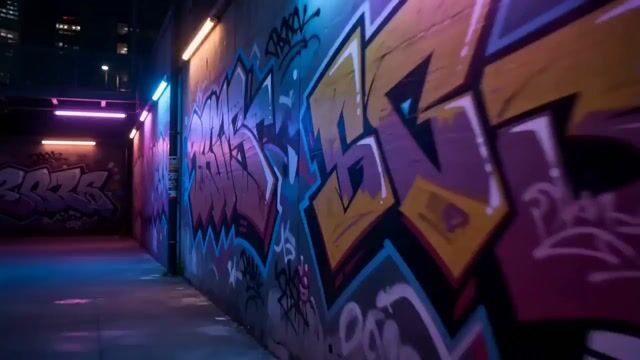
30-Second AI Video Generation

Generate native 30-second Seedance 2.5 videos for longer product demos, ads, explainers, and concept scenes. Build more continuous shots with less clip stitching and fewer restarts.

Generate

AI Video Editing and Iteration

Refine Seedance 2.5 video outputs without rebuilding every shot. Adjust details, adapt assets for new markets, and keep useful footage consistent across revisions.

Start Creating

Character and Style Consistency

Use reference inputs to help keep faces, products, environments, and brand style consistent across Seedance 2.5 AI video generations, longer shots, and follow-up edits.

Try it

Production guide

How to get more useful AI video results

A stronger AI video workflow starts before you click generate. The goal is not to write the longest prompt, but to give Seedance 2.5 the right constraints, references, and review criteria so each credit moves the project closer to a usable clip. Use this checklist when you are comparing AI video tools, planning a campaign, or turning rough creative ideas into production-ready assets.

Write prompts around the final job

Start with the outcome you need: product demo, ad hook, course visual, launch teaser, or concept shot. Then describe the subject, setting, camera movement, lighting, aspect ratio, and viewer takeaway. A prompt like this gives the Seedance 2.5 AI Video Generator a production target instead of a loose visual mood, which makes the first result easier to judge and revise.

Use references when consistency matters

Upload product photos, character images, storyboard frames, style boards, video clips, or audio cues when the output must match an existing asset. Up to 50 multimodal references can help Seedance 2.5 keep materials, faces, environments, and brand details more stable across longer 30-second videos. For ecommerce and advertising work, references usually matter more than adding extra adjectives to the prompt.

Plan edits before rerendering

Review each generated clip for the parts that already work: subject pose, camera path, background, product angle, or pacing. If most of the shot is useful, local editing can be faster than starting over. This is especially helpful when adapting the same Seedance 2.5 video for a new market, different ad format, seasonal background, or small brand detail.

Check rights and publishing quality

For commercial projects, use reference assets you own or are licensed to use, avoid protected characters or celebrity likenesses without permission, and review the final video before publication. Check text legibility, hands, product details, continuity, and claims made by the scene. A practical AI video workflow treats generation as production support, not as a replacement for editorial judgment.

AI video use cases for creators and teams

Seedance 2.5 social video example for influencers

Create consistent social clips

Turn prompts or reference images into short Seedance 2.5 AI videos for Reels, Shorts, and TikTok tests. Keep your visual style consistent while you compare hooks and formats.

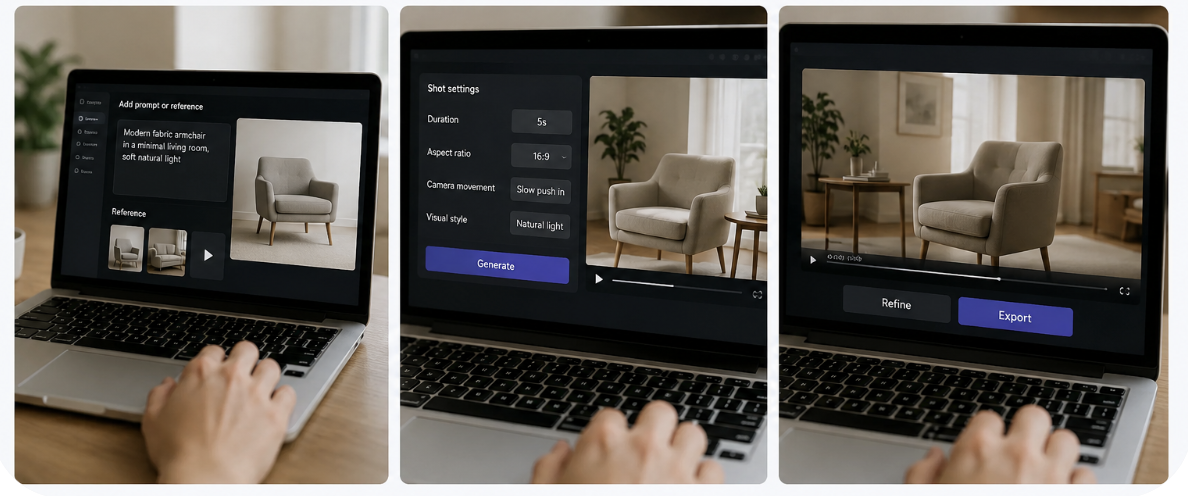
How to create a 30-second AI video

Build a 30-second Seedance 2.5 AI video from a prompt, image, or reference input, then refine the result before export.

Step 1: Add a prompt or reference

Start with a text prompt, product image, video clip, or other reference input so Seedance 2.5 has a clear subject and style.

Step 2: Set the shot direction

Choose duration, aspect ratio, camera movement, and visual style. Clear direction helps Seedance 2.5 match your AI video use case.

Step 3: Generate and refine

Create a Seedance 2.5 video, review the result, then adjust the prompt or references before exporting the final clip.

Create a Video

Creator feedback

Loved by Creators Worldwide

I use it to test a few openings before I edit. It helps me find the right visual direction faster.

Evan Carter · Short-form creator

I can turn a product image into motion concepts without booking a shoot. It is useful for early ad tests.

Maya Patel · Product marketer

For launch work, I just need a clear visual draft first. Seedance 2.5 gets me there quickly.

Noah Bennett · Launch content lead

For tutorials, short visual scenes are enough. I use them between explanations to make the lesson easier to follow.

Clara Mendes · Course creator

Pricing

Choose the plan that works best for you

Cancel anytime
Monthly

Basic

$19.9/mo

800 Credits/mo

  • 800 credits/month
  • Up to 160 images/month
  • Up to 26 videos/month
  • All AI image and video models
  • Watermark-free exports
  • Commercial use license
Popular

Pro

$39.9/mo

1,800 Credits/mo

  • 1,800 credits/month
  • Up to 360 images/month
  • Up to 60 videos/month
  • Private generation
  • Priority processing & support
  • Commercial use license
Monthly

Max

$129.9/mo

7,500 Credits/mo

  • 7,500 credits/month
  • Up to 1,500 images/month
  • Up to 250 videos/month
  • Fastest processing
  • Early access to new models
  • Commercial use license

FAQ

Clear answers about Seedance 2.5 AI video generation, reference inputs, 30-second clips, and commercial use.

Yours isn't here? Email the team
What is the Seedance 2.5 AI video generator?

Seedance 2.5 creates AI videos from prompts, images, and reference media. It is built for longer shots, native 4K output, multimodal control, and practical video editing workflows.

How do I create a Seedance 2.5 video?

Add a prompt or reference image, set the shot direction, choose your format, then generate and refine the clip before export.

What reference inputs does Seedance 2.5 support?

You can use product photos, character images, video clips, audio cues, text notes, and 3D references to guide style, motion, composition, and consistency.

Can Seedance 2.5 generate 30-second AI videos?

Yes. Seedance 2.5 supports native 30-second video generation, making it useful for ads, product demos, explainers, and story-driven social clips.

Can I use Seedance 2.5 videos for commercial projects?

Yes, paid plans are designed for commercial use. Make sure you have rights to any uploaded references and review final outputs before publishing.

Create your first production-ready AI video

Turn Seedance 2.5 prompts and reference assets into polished 30-second AI videos with 4K clarity, consistent style, and fewer editing passes.